OpenApply
2024
Review Mode: speeding up admissions review
I redesigned Review Mode, a SaaS feature that helps school admissions teams review applicants faster and collaborate more easily, raising onboarding completion from 60% to 90%.

Overview
Helping admissions teams review thousands of applicants
During admissions season, schools have to read through a huge number of applications. Reviewers carefully go through documents and personal information submitted by each applicant, then hold back-and-forth discussions with colleagues to decide whether the applicant is a match for the school.
Review Mode is a feature that helped OpenApply differentiate itself from the market. Optimizing it would make OpenApply even more stable and competitive.
The challenge
Every school has its own review process, and as a SaaS product we needed to account for all of them. Some schools review in sequence, others do not. Popular schools can receive tens of thousands of applications, which makes the process very cumbersome.
How might we…
help reviewers move through the review process faster?
make it easy for the whole admissions team to collaborate?

Results
60% → 90%
Onboarding completion rate increased
100%
asynchronous collaboration among reviewers
64%
Support ticket volume decreased
Research
Starting with the people who review applications
Based on those, we identified 6 common pain points, which led us to the next step.

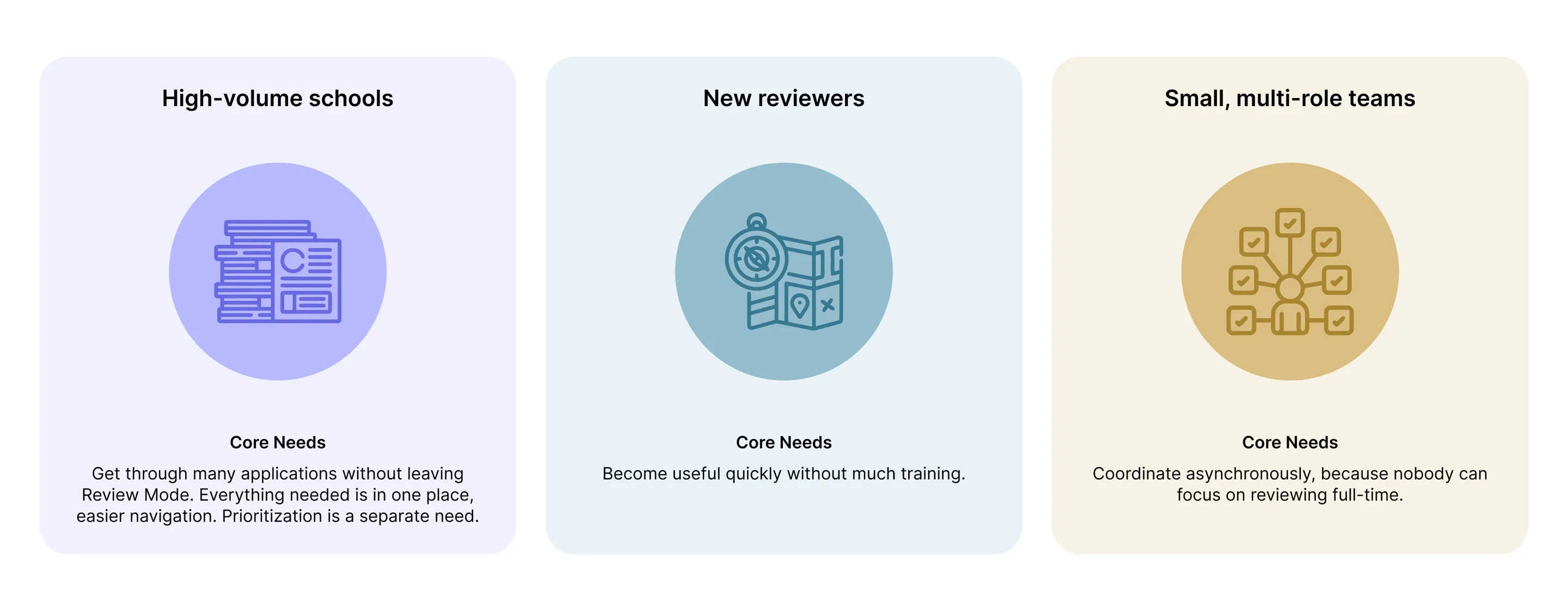
From the initial research, we identified three key scenarios and goals to design around.
User journey
With the business goal in mind, I sketched a current-state user journey map to identify opportunities for improvement. It surfaced several potentially confusing points in the flow. By eliminating these from the new design, we could end up with a much friendlier and more intuitive experience.

Ideation
From sketches to a testable prototype
Based on the initial feedback from Product, I created wireframes and sketches to discuss the project scope with Product Managers and Developers.
After setting the project scope, I started on high-fidelity designs. With several prototype options on the table, I proposed to our team that we develop a complete prototype and test it with our selected users.

Testing
Testing the first design with real reviewers

After discussions with the team, we came up with the high-fidelity prototype of the new flows and started recruiting subjects for the test who fit our criteria.
We ran 4 usability tests and received many positive reactions. We also identified some additional issues that had not come up previously.
With users’ feedback in mind, we kept asking ourselves two questions to make the final work as strong as possible:
How do we accelerate the review process?
How do we enhance admissions team collaboration?

After first design, I conducted usability testing with users to identify gaps in new design.
Designs
Iterating on the original, the initial design, and the revision
We are also devoted to bringing a sense of participation to every team member’s ideas at every design stage, so we shared our new designs with the whole team throughout.
Takeaways
What I learned
Stepping out of the designer’s perspective
Through user interviews, we saw more of our users’ pain points. When I stepped out of the designer’s perspective, I saw that my design was recognized, while many more things needed to be considered comprehensively. At the same time, I appreciated being on a wonderful team that could quickly and dynamically adjust the project scope.
Recruiting and connecting with users remotely
Being fully remote with users across distinct cultures, time zones, and sometimes languages made it challenging to keep the connection. It was also interesting, because we got to share diverse perspectives.


